A Customer Finds You on Instagram. Your Own Rider Delivers the Order. Here’s the Full Journey.
One link can turn Instagram DMs, WhatsApp messages, QR scans and NFC taps into direct restaurant orders—complete with rewards, kitchen updates, rider assignment and live delivery tracking.
Dineezy Team
30 Aug 2026 · 5 min read

On this page18 sections
- One ordering link, many customer touchpoints
- Five ways customers can order
- Dine-in
- Takeaway
- Reorder
- Car dining
- Home delivery
- A simple home-delivery example
- What happens inside the restaurant?
- Delivery through the restaurant’s own rider
- Customer updates and live tracking
- More than a digital menu
- One link should complete the journey
- Frequently asked questions
- Can customers order without installing an application?
- Can restaurants use their own riders?
- Can the delivery charge differ from the rider earning?
- Can restaurants still use Swiggy and Zomato?
It is 7:30 PM in Lucknow.
Rahul sees an Instagram Reel from his favourite vegetarian restaurant.
He comments:
“MENU”
An automatic DM sends him the restaurant’s ordering link.
Rahul taps it. The digital menu opens directly on his phone—no application download and no phone call.
He orders Paneer Lababdar, Dal Makhani, Butter Naan and Veg Biryani. He uses rewards earned during his previous visit and enters his delivery address.
The restaurant receives the order, the kitchen prepares it, and the manager assigns it to the restaurant’s own rider.
Rahul receives WhatsApp updates and follows the delivery until it reaches his door.
The complete journey looks like this:
Instagram → Digital menu → Direct order → Kitchen → Rider → Live tracking → Delivery
That is the difference between simply having a digital menu and running a connected restaurant delivery system.
One ordering link, many customer touchpoints
Dineezy gives the restaurant a customer-ordering website with a digital menu.
The restaurant can place its ordering link on:
WhatsApp automation
Instagram auto-DM
Instagram link in bio
Restaurant website
Google Business Profile
QR codes on tables, bills and packaging
NFC cards or table stands
Customer offers and follow-up messages
A customer may discover the restaurant through Instagram today and scan a QR code tomorrow.
Both entry points can lead to the same menu and order system.
Five ways customers can order
The Dineezy menu can support different customer needs:
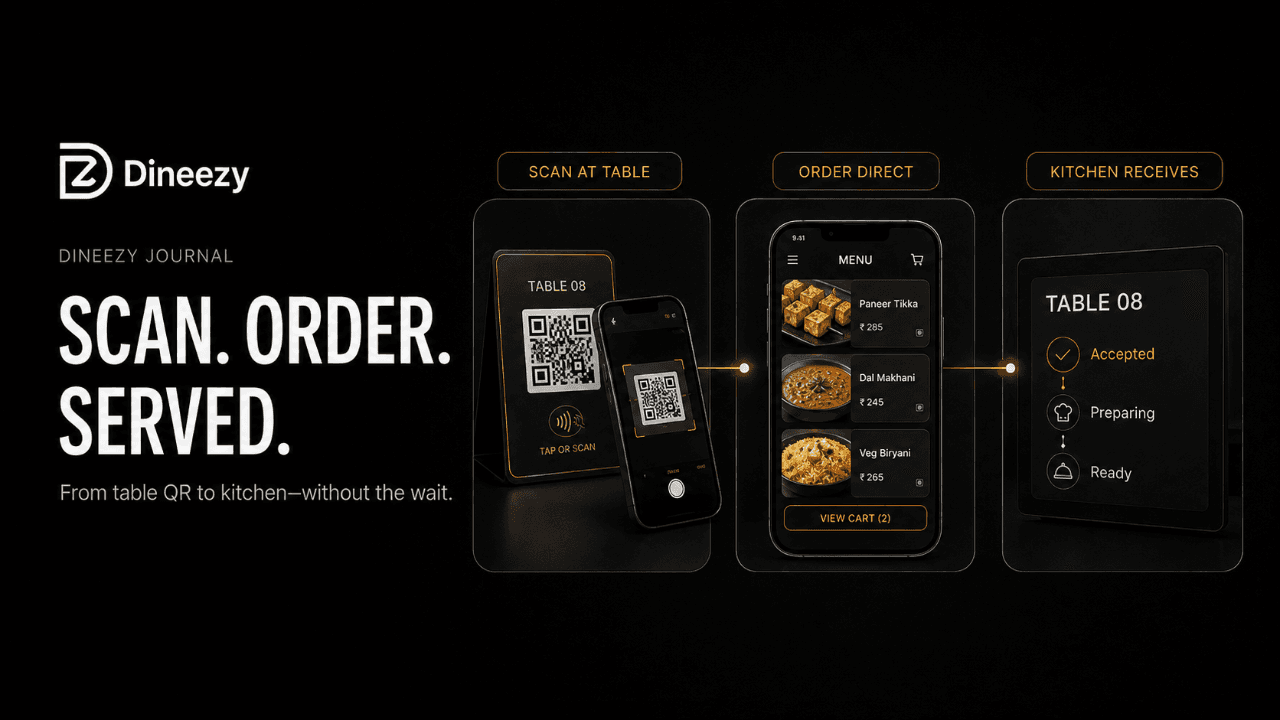
Dine-in
Customers scan the table QR code, view the menu and place an order connected to their table.
Takeaway
Customers order before reaching the restaurant and collect the food when it is ready.
Reorder
Returning customers can repeat a previous or favourite order without searching through the complete menu again.
Car dining
Customers order from their car and provide the required vehicle or location details.
Home delivery
Customers enter their address and order food for delivery through the restaurant’s own rider team.
A simple home-delivery example
Rahul orders:
Paneer Lababdar — ₹360
Dal Makhani — ₹280
Four Butter Naan — ₹220
Veg Biryani — ₹260
Two Gulab Jamun — ₹120
Food total: ₹1,240
Rahul has an eligible ₹100 reward from his previous visit.
₹1,240 − ₹100 reward = ₹1,140
The restaurant adds a ₹40 delivery charge.
Final customer amount: ₹1,180
Rahul confirms his address and places the order. The restaurant receives complete order details instead of separate WhatsApp messages.
What happens inside the restaurant?
The order appears in the restaurant’s order table with:
Customer details
Ordered items
Add-ons and instructions
Delivery address
Applied reward
Order amount
Delivery charge
The restaurant reviews and accepts the order.
It then moves through clear stages:
New → Accepted → Preparing → Ready → Rider assigned → Dispatched → Delivered
The kitchen receives the item details and prepares the food. When packing is complete, the restaurant marks the order as ready.
Delivery through the restaurant’s own rider
Dineezy includes a rider application for the restaurant’s delivery team.
The manager assigns Rahul’s order to an available rider. The rider receives the booking with the required pickup, customer and delivery information.
The rider collects the order, and the restaurant marks it as dispatched.
The customer delivery charge and rider earning can be managed separately.
For example:
Customer delivery charge: ₹40
Rider earning: ₹60
Restaurant contribution: ₹20
This lets the restaurant keep delivery affordable for the customer while paying the rider according to its own pricing system.
Customer updates and live tracking
After dispatch, Rahul should not need to call and ask:
“Rider kahan hai?”
He can receive relevant updates on WhatsApp and follow the active delivery.
The restaurant can also see which rider has the order and monitor its progress. Geofencing helps provide location-based visibility during the delivery journey.
This connects all three sides:
The customer knows the order status.
The restaurant knows who is delivering it.
The rider receives the assigned booking.
More than a digital menu
A digital menu only shows food.
A connected restaurant delivery management system brings together:
Instagram and WhatsApp discovery
QR and NFC ordering
Dine-in, takeaway and home delivery
Customer rewards
Order acceptance
Kitchen preparation
Rider assignment
Separate delivery and rider pricing
WhatsApp updates
Live delivery tracking
Repeat customer engagement
Restaurants can continue using Swiggy and Zomato for visibility. Dineezy gives existing and returning customers an additional direct way to order.
One link should complete the journey
A link in your Instagram bio is not a complete delivery system.
A WhatsApp message is not order management.
A rider group is not a rider application.
Dineezy connects the journey from the customer’s first click to the final delivery.
One link. One order. One rider. One complete journey.
Book a Dineezy demo and see how your restaurant can manage direct ordering, preparation, rider dispatch and delivery tracking.
Frequently asked questions
Can customers order without installing an application?
Yes. Customers can open the restaurant’s web-based menu through a link, QR code or supported NFC touchpoint.
Can restaurants use their own riders?
Yes. Restaurants can assign direct orders to their own riders through the Dineezy Rider application.
Can the delivery charge differ from the rider earning?
Yes. Restaurants can manage the customer delivery fee and rider earning separately.
Can restaurants still use Swiggy and Zomato?
Yes. Dineezy can operate as an additional direct-ordering channel for existing and returning customers.
Dineezy Team
Author at Dineezy