Restaurant Purchase Management: How to Control Suppliers, Stock and Ingredient Costs
A practical procurement roadmap for restaurant owners. Learn how to manage suppliers, enforce Goods Received Note (GRN) audits, prevent price creep, and set reorder points.
Dineezy Team
13 Oct 2026 · 6 min read
On this page18 sections
- The Hidden Profit Drain at the Receiving Dock
- The 5-Stage Restaurant Purchasing Lifecycle
- 1. Par-Level Review and Reorder Generation
- 2. Formal Purchase Order (PO) Generation
- 3. Receiving Dock Inspection (Weigh-in & GRN)
- 4. Three-Way Reconciliation
- 5. Scheduled Payment Reconciliation
- How Vendor Price Creep Quietly Eats Profit Margins
- How to Stop Price Creep:
- Setting Minimum Stock Levels and Reorder Points
- Worked Example: Fresh Cooking Butter
- The Back-Door Receiving Checklist for Kitchen Staff
- Manual Logbooks vs. Integrated Inventory Software
- Frequently Asked Questions
- What is a Goods Received Note (GRN) in restaurant operations?
- How many suppliers should a restaurant work with?
- How does modern restaurant software improve procurement?
- Take Control of Your Kitchen Supply Chain
The Hidden Profit Drain at the Receiving Dock
Ask any experienced restaurant operator where money leaks out of an eatery, and they will point to two places: the billing cash counter and the kitchen back door where suppliers deliver goods.
While restaurateurs spend hours refining dining room presentation and marketing menus, the procurement workflow behind the scenes is often completely neglected.
In many Indian kitchens, supplier procurement operates on messy paper notes and unverified handoffs:
- Fresh dairy, poultry, and vegetables arrive during busy morning prep without being weighed on scales.
- Delivery boys leave handwritten slips with missing item prices.
- Vendor invoice rates quietly tick upward month after month without management approval.
- Short deliveries go unnoticed until head chefs run out of core ingredients during Friday dinner service.
Establishing a structured Purchase Management and Vendor Audit SOP stops these vulnerabilities and protects food margins from day one.
The 5-Stage Restaurant Purchasing Lifecycle
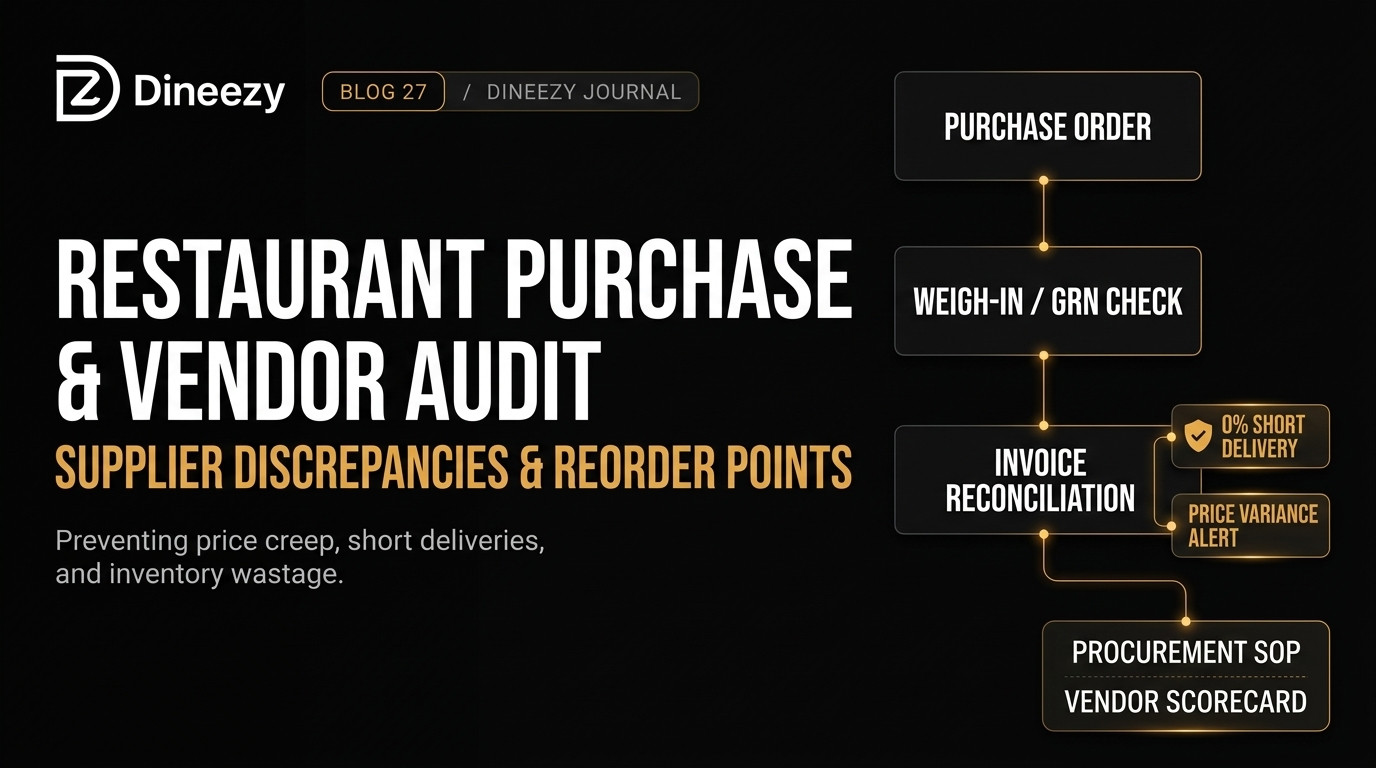
A professional restaurant procurement workflow follows five clear, sequential stages:
1. Par-Level Inventory Review and Reorder Generation
2. Formal Purchase Order (PO) Creation
3. Receiving Dock Weigh-in & Goods Received Note (GRN) Inspection
4. Three-Way Invoice Match (PO vs. GRN vs. Invoice)
5. Scheduled Supplier Payment Settlement
1. Par-Level Review and Reorder Generation
Instead of chefs guessing what to order each night based on memory, purchasing should be governed by Par Levels (the minimum quantity of each ingredient required to sustain service until the next delivery).
2. Formal Purchase Order (PO) Generation
Every delivery request must be logged in writing with exact quantities and agreed-upon unit prices. Verbal phone orders invite misunderstandings and dispute excuses.
3. Receiving Dock Inspection (Weigh-in & GRN)
When goods arrive at the back door, a designated receiving staff member inspects quality, checks expiry dates, and physically weighs items on a calibrated digital receiving scale.
4. Three-Way Reconciliation
Before accounts pays a bill, the supplier's final invoice must match three documents:
- The original Purchase Order (what was approved).
- The physical Goods Received Note (GRN) (what actually arrived).
- The Supplier Invoice (what is being billed).
5. Scheduled Payment Reconciliation
Pay vendors according to agreed credit cycles (e.g., 7-day or 15-day terms) contingent upon clean delivery audit logs.
How Vendor Price Creep Quietly Eats Profit Margins
Price Creep is the subtle, unannounced inflation of supplier unit rates over time.
A vendor might agree to supply cooking oil at ₹125/litre in January. By April, the rate on their handwritten delivery slip has drifted to ₹138/litre, and by August to ₹146/litre. Because kitchen staff focus only on whether oil arrived for cooking, the price increase goes unflagged.
Across dozens of weekly supplier line items—cheese, flour, tomatoes, spices, chicken, and packaging—unmonitored price creep can expand your food cost by 3% to 5% of gross revenue without a single dish changing on your menu.
How to Stop Price Creep:
- Maintain a Master Vendor Rate Card updated and signed monthly.
- Require software or receiving staff to flag any invoice line item exceeding agreed rates before stock acceptance.
- Maintain relationships with at least two qualified vendors for all high-volume commodity ingredients to cross-check market pricing weekly.
Setting Minimum Stock Levels and Reorder Points
Running out of an ingredient during peak service forces panic purchases from nearby retail shops at full consumer prices, instantly destroying that dish's profit margin.
To eliminate both stockouts and excess spoilage, calculate the Reorder Point (ROP) for each critical ingredient:
$$\text{Reorder Point} = (\text{Average Daily Usage} \times \text{Supplier Lead Time}) + \text{Safety Buffer}$$
Worked Example: Fresh Cooking Butter
- Average Daily Usage: 6 kg
- Supplier Delivery Lead Time: 2 days (from order placement to back-door arrival)
- Safety Buffer Stock: 4 kg (to cover unexpected weekend demand surges)
$$\text{Reorder Point} = (6 \text{ kg} \times 2 \text{ days}) + 4 \text{ kg} = 16 \text{ kg}$$
The moment your butter stock drops to 16 kg, a purchase order for the next batch must be generated immediately.
The Back-Door Receiving Checklist for Kitchen Staff
Never let delivery staff simply drop boxes in the walk-in and leave. Enforce this 5-point receiving checklist:
1. Verify Count and Physical Weight: Place all loose vegetables, meats, and dairy on a digital receiving scale. Reject crates billed at gross weight that include heavy wooden or plastic containers.
2. Inspect Temperature Standards: Fresh poultry and dairy must arrive below 4°C. Thawed or warm proteins must be rejected immediately to uphold FSSAI hygiene guidelines.
3. Check Expiry Dates and Manufacturing Batches: Refuse dairy, packaged sauces, or baked goods with short remaining shelf life.
4. Log Discrepancies on the Spot: If a supplier delivered 18 kg of onions instead of the 25 kg billed, note the shortage directly on the delivery challan and have the delivery driver countersign.
5. Enforce FIFO Storage (First-In, First-Out): Rotate newly received stock to the back of the shelf so older inventory is utilized first, preventing spoilage write-offs.
Manual Logbooks vs. Integrated Inventory Software
| Operational Factor | Paper Slips & Logbooks | Integrated POS & Stock Management |
|---|---|---|
| Price Variance Tracking | High risk; requires manual page audits | Automatic alerts when invoice price exceeds agreed rate |
| Stock Deduction | None; requires manual weekend physical counts | Automated real-time deduction based on sold recipe items |
| Short-Delivery Audits | Paper slips get lost or stained in kitchens | Digital GRN logs tied directly to supplier balances |
| Centralized Procurement | Nearly impossible for multi-outlet restaurants | Central commissary purchase orders routed across all branches |
Frequently Asked Questions
What is a Goods Received Note (GRN) in restaurant operations?
A GRN is an internal record confirming that specific quantities of goods were physically inspected, weighed, and accepted into kitchen inventory by restaurant staff.
How many suppliers should a restaurant work with?
For core commodity ingredients (dairy, poultry, oils, staple grains), working with two vetted suppliers prevents supply chain disruptions and ensures price competition. Specialized items (artisan coffee, imported cheeses) can rely on dedicated single vendors.
How does modern restaurant software improve procurement?
Platforms like Dineezy bring visibility to restaurant operations, helping owners understand menu item popularity, table velocity, and ingredient demand patterns to prevent over-purchasing and costly kitchen spoilage.
Take Control of Your Kitchen Supply Chain
A successful restaurant is built on strong culinary craftsmanship, but sustained profitability relies on operational discipline. Implementing clear purchase checklists, verifying vendor deliveries, and automating inventory tracking stops back-door leakage and protects your margins.
Discover Dineezy's Restaurant Solutions at dineezy.in/business to modernize your floor operations, billing, and restaurant management.
Dineezy Team
Author at Dineezy